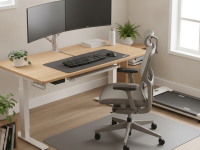
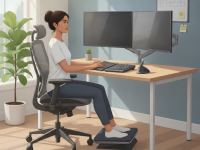
Poor sitting habits and prolonged desk time are common triggers for sciatic symptoms. By optimizing chair support, desk height, monitor placement, and input devices, you can create a healthier routine that supports the lower back, hips, and legs. The result is less irritation, better comfort, and sustained productivity throughout the day.
What is sciatica and why your desk setup matters
Sciatica refers to irritation or compression of the sciatic nerve, typically causing sharp pain, numbness, or tingling that travels from the lower back down the leg. While structural changes in the spine can contribute, daily postural habits are a major modifiable factor. An ergonomic desk setup helps reduce mechanical stress on the lumbar spine and hips, potentially lowering the frequency and intensity of sciatic flare-ups.
How posture affects the sciatic nerve
Suboptimal alignment can increase pressure on the lumbar discs and the piriformis region, which can irritate the nerve as it exits the spine. Small adjustments—such as a slightly reclined backrest, a supportive seat cushion, or a more neutral wrist position—can alter pelvic tilt and relieve nerve tension. Consistency matters: even modest improvements accumulate over a typical workweek.
Key elements of an ergonomic desk setup for sciatica prevention
Chair and seating position
- Set chair height so feet rest flat on the floor with thighs parallel to the ground.
- Choose a chair with adjustable lumbar support and a backrest that supports the natural S-curve of the spine. A slight backward tilt (about 100–110 degrees) often reduces lumbar strain.
- Ensure an appropriate seat depth to support the thighs without pressing behind the knees.
- Armrests should be positioned so shoulders stay relaxed while the elbows are close to the body.
Desk height, monitor, and alignment
- Desk height should allow your forearms to rest parallel to the floor when typing, with elbows at about 90–110 degrees.
- Position the monitor top at or slightly below eye level and about an arm’s length away to prevent neck strain and forward head posture.
- Keep the screen directly in front of you to avoid twisting the torso, and ensure ambient lighting minimizes glare.
Keyboard, mouse, and input devices
- Place the keyboard and mouse within easy reach so wrists remain in a neutral, straight position.
- Consider an adjustable keyboard tray or a split/ergonomic keyboard to reduce wrist deviation and shoulder load.
- Use a mouse that fits well in your hand and allows a smooth, low-friction movement to minimize forearm tension.
Leg space, feet, and movement
- Ensure ample legroom and avoid crossing legs or tucking feet under the chair for long periods.
- Use a footrest if your feet don’t comfortably reach the floor, which helps maintain a 90-degree knee angle.
- Incorporate short movement breaks every 20–30 minutes to promote blood flow and reduce cumulative loading on the lower back.
Standing desk and movement breaks
- If you use a sit-stand desk, alternate between sitting and standing every 30–60 minutes to reduce prolonged static loading.
- Integrate dynamic movements such as light stretches, ankle pumps, or hip opens during breaks to support mobility and reduce stiffness.
Practical steps to configure your workspace
Begin with a quick audit of your current setup, then implement changes in stages to minimize disruption. Small, incremental improvements often yield the best long-term results for sciatica prevention and overall comfort.
Quick-start checklist
- Set chair height so feet are flat on the floor and thighs are supported.
- Align hips and knees at roughly 90–110 degrees, ensuring the lower back is supported by the chair’s lumbar region.
- Position the monitor so the top line of text is at or just below eye level, about an arm’s length away.
- Place the keyboard and mouse at elbow height to keep wrists straight and shoulders relaxed.
- Use a footrest if knees sit higher than hips or if feet do not rest firmly on the floor.
- Set a reminder to stand and stretch or walk for 1–2 minutes every 20–30 minutes.
Common mistakes to avoid
- Tendency to slouch or lean forward, increasing thoracic and lumbar strain.
- Raising the keyboard or placing it too far away, which causes shoulder shrug and wrist deviation.
- Sitting with legs crossed or feet dangling, which disrupts pelvic alignment and circulation.
Personalization and ongoing assessment
Ergonomics is highly individual. After you set up your workspace, monitor how your body responds over two to four weeks and adjust as needed. Persistent pain or renewed symptoms should prompt a clinician consultation to rule out conditions requiring targeted therapy.
How to assess comfort and symptoms
- Keep a simple pain diary noting when discomfort appears and what activities correlate with changes.
- Watch for numbness, tingling, or leg weakness during and after work sessions.
- Reassess chair height, back support, and monitor position if symptoms shift with posture or task type.
Evidence-based tips from clinicians
Clinical guidance supports combining ergonomic setup with movement variability. Complementing setup with hip, glute, and core exercises can improve spinal stability and reduce sciatic symptoms over time. If pain persists beyond adjustments, a physical therapy evaluation can tailor a plan that targets motor control and flexibility in the lower back and hips.
Maintaining posture and movement
Prioritize neutral spine alignment, a comfortable pelvic tilt, and regular micro-movements during the day. Simple routines like standing for 2–3 minutes, interspersed with light stretches, can significantly reduce cumulative loading on the lumbar spine.
Maintenance and long-term plan
Schedule periodic reviews of your workstation every few months as you adapt to changes in your body and work tasks. Upgrading components such as a chair with improved lumbar support, a height-adjustable desk, or an ergonomic keyboard can help maintain benefits over the long term.
In addition to equipment, cultivate sustainable habits: steady movement, ergonomic micro-breaks, and a balanced mix of sitting, standing, and walking. This holistic approach supports ongoing sciatic health and overall well-being, making your workspace a tool for prevention rather than a source of discomfort.