An ergonomic desk setup for sciatica prevention can transform how you feel at the end of a workday. If you spend long hours seated, small changes in how you sit, position your computer, and move throughout the day can reduce nerve irritation and lower the risk of persistent back and leg pain. This article explains practical, evidence-informed steps to create a workstation that supports spinal health and comfort.
Why desk ergonomics matter for sciatic nerve health
Sciatica results from irritation or compression of the sciatic nerve, which runs from the lower spine through the hips and down each leg. Prolonged poor posture and awkward joint angles can aggravate the lower back and hips, increasing nerve tension. An ergonomic desk setup helps maintain natural spinal curves, reduces excessive strain, and encourages regular movement—key factors in sciatica prevention.
Core elements of an ergonomic setup for sciatica prevention
Chair and lumbar support
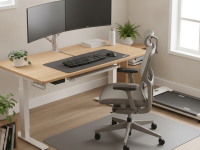
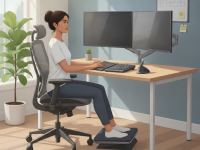
Choose a chair with adjustable seat height, backrest tilt, and built-in lumbar support. Your hips should be slightly above your knees, and the lower back should be gently supported to preserve the natural curve of the spine. If the chair lacks adequate lumbar support, add a lumbar roll or a cushion designed for office use. The goal is to avoid slouching and to maintain neutral spine alignment during prolonged sitting.
Desk height, knee space, and posture
The desk height should allow your forearms to rest on the desk with about a 90-degree elbow angle. Your wrists should stay straight while typing to prevent additional forearm strain. Adequate knee clearance is essential; ensure there is enough space under the desk to avoid pressing the back of the thighs against the front edge. When your hips sit back in the chair, your feet can stay flat on the floor or on a footrest for optimal leg circulation.
Monitor height and keyboard placement
Position the monitor so the top of the screen is at or slightly below eye level and about an arm’s length away. This reduces neck strain and keeps your head in a neutral position. The keyboard and mouse should be within easy reach, allowing the shoulders to stay relaxed. If needed, use a keyboard tray or adjustable monitor arm to fine-tune alignment.
Foot support and leg positioning
Keep feet flat on a stable surface. If your feet don’t reach the floor, a sturdy footrest helps maintain proper knee and hip angles. Avoid crossing your legs, which can alter pelvic tilt and contribute to uneven spinal loading. Regularly shifting weight and extending the ankles can improve circulation and reduce fatigue.
Sit-stand options and movement strategy
Alternating between seated and standing positions can reduce cumulative spinal loading, but it should be done mindfully. Start with short intervals and gradually increase as tolerated. When standing, keep a small bend in the knees, engage the core, and avoid locking the knees. Microbreaks—2 to 3 minutes of gentle movement every 30 to 45 minutes—help relieve muscle tightness and promote circulation.
Desk layout and accessories
Organize the desk so commonly used items are within easy reach to minimize excessive twisting or leaning. Use an adjustable monitor arm, a vertical mouse, and a well-placed keyboard to promote neutral forearm positions. A simple, clean setup reduces the cognitive load of maintaining posture and encourages adherence to ergonomic principles.
Pelvic tilt, hip hinge, and dynamic sitting
Practice a neutral pelvic position by gently tilting the pelvis forward and backward in a controlled manner during short pauses. Subtle hip hinge movement during typing breaks helps maintain mobility and prevents stiffness. Dynamic sitting, which includes small shifts in posture and occasional micro-movements, supports spinal health over long workdays.
Personalization tips for different needs
- If you have a preexisting low back pain or a herniated disc, consult a clinician to tailor chair settings and movement goals before making large changes.
- For taller or shorter individuals, upgrade to height-adjustable desks and chairs to align eyes, elbows, and hips correctly.
- If you wear footwear with poor arch support, consider supportive shoes or a higher-quality footrest to maintain stable posture.
- Individuals with limited mobility can work with ergonomic assessors to adapt equipment, such as a desk-mounted keyboard tray or an ergonomic chair with supportive arms.
Practical routines to reinforce an ergonomic culture
Beyond the setup, consistent habits reinforce the benefits of an ergonomic desk for sciatica prevention. Start with a simple morning routine that checks posture, desk height, and screen position. Schedule reminders for microbreaks, hip circles, and hamstring stretches. Routine adjustments reduce the chance that discomfort becomes chronic and help sustain a healthy workday.
Simple, science-aligned stretches and movements
- Seated hamstring stretch: extend one leg, lean forward gently from the hips, and hold for 20–30 seconds on each side.
- Hip-flexor stretch: kneel on one knee with a forward tilt of the pelvis to open the hip; hold for 20–30 seconds per side.
- Seated figure-four stretch: cross one ankle over the opposite knee and lean forward gently to stretch the glutes.
- Postural microbreaks: rotate shoulders, roll the neck, and perform ankle pumps to improve circulation every 30–45 minutes.
When to seek professional assessment
Despite thoughtful setup and consistent movement, persistent sciatic symptoms may require medical evaluation. A physical therapist or ergonomics specialist can perform an individualized assessment, measure range of motion, and tailor equipment and exercises to your needs. If numbness, weakness, or bowel or bladder changes accompany leg pain, seek urgent medical attention.
Putting it all together
The essence of an ergonomic desk setup for sciatica prevention is a combination of properly adjusted furniture, an organized work surface, and a cadence of movement. By aligning your chair, desk, and monitor, keeping your hips and spine in neutral positions, and incorporating regular breaks, you create a workplace that supports long-term spinal health. Small, consistent adjustments today can yield meaningful relief and prevent flare-ups in the future.
Conclusion
Investing in an ergonomic desk setup for sciatica prevention is a practical step toward comfortable, pain-free workdays. Start with a few prioritized changes—lumbar-supported seating, correct desk height, and proper monitor alignment—then layer in movement routines and simple accessories. With steady implementation, you can improve posture, reduce sciatic nerve strain, and sustain a healthier workflow over time.
Create an ultra-detailed, cinematic, hero-style infographic illustration of an ergonomic home/office desk setup designed for sciatica prevention. The scene features a user seated with a chair that has visible lumbar support, feet flat on a stable footrest, knees at a 90-degree angle, and a monitor at eye level. Include a sit-stand desk with a gentle incline, adjustable keyboard tray, and a modular monitor arm. Show clear labels for key elements: lumbar support, chair height, monitor height, keyboard and mouse placement, footrest, and sit-stand mechanism. Use soft, clinical colors (blue, gray, white) with high contrast for readability. Add small callouts describing ideal angles (elbows ~90°, wrists neutral, hips neutral) and a subtle timeline icon for short microbreaks. Include a secondary graphic panel illustrating a few simple stretches (hip flexor stretch, hamstring stretch, seated spinal twist) with arrows indicating movement. The overall style should be photorealistic, with natural lighting, realistic textures (fabric, wood, metal), and a clean, trustworthy aesthetic suitable for a health education article.