Understanding the connection between sciatica and the workplace
Sciatica is pain that travels along the sciatic nerve, often triggered or worsened by prolonged sitting, poor posture, or tight hips and hamstrings. A workstation that supports neutral spine alignment helps minimize nerve compression and strain on the lower back. By aligning the pelvis, hips, and knees, you reduce stress on the lumbar nerves and improve overall comfort during long workdays.
Core components of an ergonomic desk setup for sciatica prevention
Chair and lumbar support
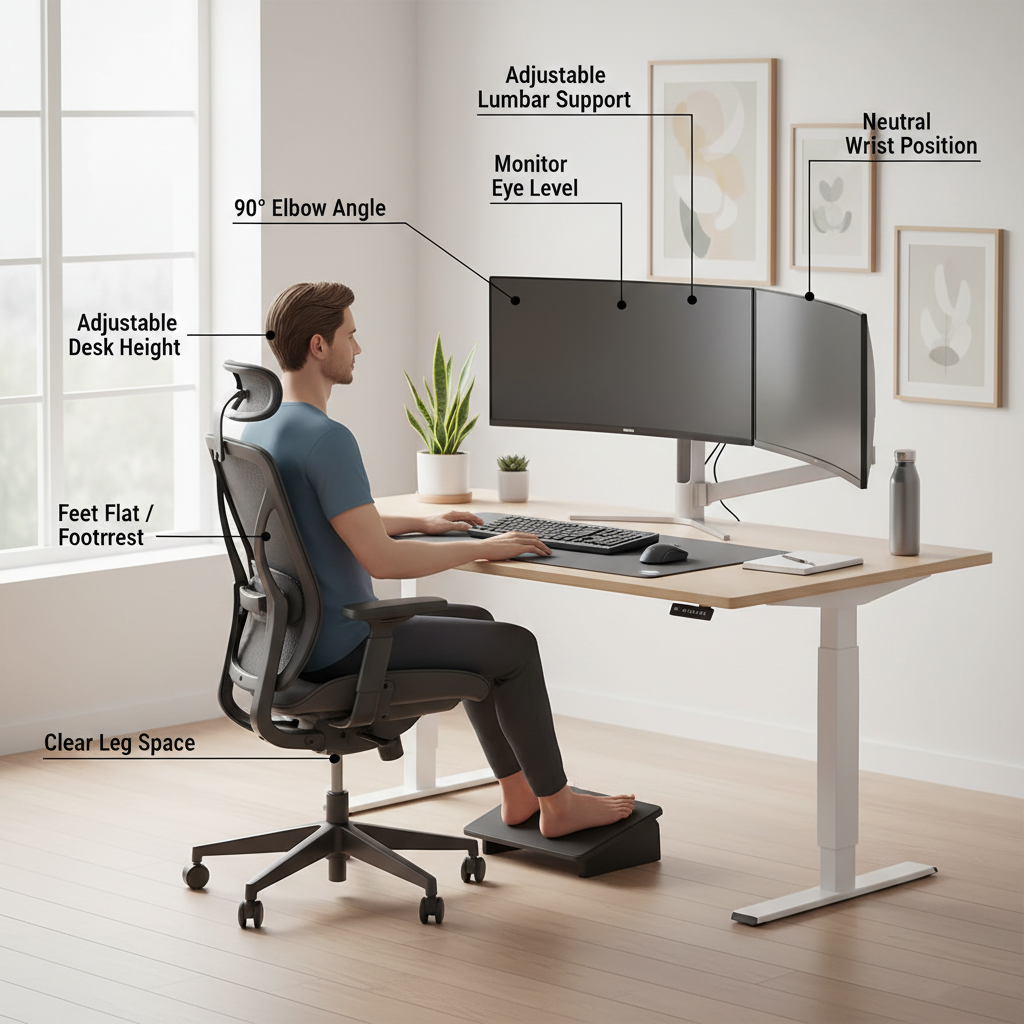
The chair is the foundation of ergonomic comfort. Choose an adjustable chair with customizable seat depth, a supportive lumbar region, and strong backrest contouring to the natural curve of your spine. When seated, your feet should rest flat on the floor or on a footrest, and your knees should be at roughly a 90-degree angle. An appropriate seat depth ensures there is a small gap between the edge of the seat and the back of the knees, supporting circulation and reducing pressure behind the thighs.
Desk height and sit-stand options
Your desk should enable elbows to stay near the sides with a comfortable 90- to 120-degree bend. The forearms, wrists, and hands should be aligned while typing to minimize tension in the shoulders and neck. A sit-stand desk or height-adjustable table helps you alternate between seated and standing postures, which can alleviate persistent pressure on the lower back when used with proper form. When standing, keep a soft knee posture and avoid locking the knees to maintain adequate circulation.
Monitor positioning and keyboard/mouse alignment
Place the monitor at eye level so you don’t need to tilt or crane your neck. The top of the screen should be at or slightly below eye level, about an arm’s length away. The keyboard and mouse should be positioned so your wrists stay straight and your elbows rest around 90 degrees. If needed, use a keyboard tray or an ergonomic keyboard to keep the wrists in a neutral position and reduce ulnar deviation during typing.
Foot support and leg positioning
Feet should be supported and uncrossed, with both feet flat on the floor or on a footrest. Avoid prolonged leg crossing, which can alter pelvic alignment and increase lower-back strain. If your legs dangle, a footrest can promote better circulation and reduce tension in the hips and lower back.
Ergonomic accessories and flexible routines
Accessories such as a small lumbar cushion, an adjustable document holder, and an anti-fatigue mat for standing work can enhance comfort. Incorporating light, frequent movement helps fatigue and nerve irritation. A practical routine includes microbreaks every 20–30 minutes and a few targeted stretches to maintain hip mobility and reduce tightness in the hamstrings and glutes.
Practical setup tips you can apply this week
Step-by-step baseline assessment
Start by measuring your current setup against key indicators: chair height, seat depth, lumbar support, monitor level, keyboard position, and foot placement. Adjust each element to promote a neutral spine, with shoulders relaxed and wrists in a neutral alignment. Re-check after a few minutes of typing or sitting to ensure comfort.
Progressive adjustments for comfort
Make one or two changes at a time rather than a full overhaul. For example, adjust the chair depth first to support the lower back without crowding the back of the knees. Then align the monitor height and finally optimize the keyboard position. This staged approach helps you identify which changes yield the most improvement for your sciatica symptoms.
Movement and posture routines
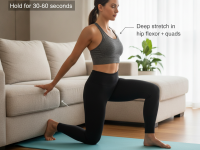
Incorporate short, scheduled breaks: stand, walk, or perform a gentle hip opener every 20–30 minutes. Simple stretches like a seated forward bend, hip flexor stretch, and ankle circles can relieve tightness that contributes to nerve irritation. Consider a quick 2–5 minute routine during breaks and a longer stretching session at the end of the day for sustained relief.
Common mistakes that aggravate sciatic symptoms—and how to avoid them
- Slouching or hunching forward while typing—keep the chest open and the spine in a natural S-curve.
- Raising or lowering the chair without adjusting the foot support—ensure feet stay flat and hips are level.
- Overreaching for the keyboard or mouse—bring devices closer to the body to maintain elbow alignment.
- Ignoring sit-stand balance—avoid prolonged standing in one position; move between postures to relieve load on the spine.
- Inadequate lumbar support—add or adjust a cushion to maintain the lower back’s natural curve.
When to seek medical advice
While an optimized desk setup can significantly reduce sciatic symptoms, persistent leg pain, numbness, weakness, loss of bladder or bowel control, or symptoms lasting more than a few weeks warrant medical evaluation. If you have a known herniated disk, spinal stenosis, or prior spine surgery, consult your clinician or physical therapist before changing your exercise or seating routine. Personalized guidance can help tailor a plan to your anatomy and activity levels.
Integrating ergonomic practices with a comprehensive plan
Ergonomics is a part of a broader approach to musculoskeletal health. Combine an ergonomic desk setup with gentle strengthening exercises for the core, hips, and glutes, as well as stretches for the hamstrings and hip flexors. A regular movement routine supports spine health, improves circulation, and reduces the cumulative load on the sciatic nerve during long workdays. If pain persists despite optimal setup, a physical therapist can assess your posture and provide targeted interventions to address nerve irritation and muscle imbalances.
Frequently asked questions
How tall should my chair be for sciatica prevention?
The chair height should allow your feet to rest flat on the floor with your knees at about a 90-degree angle. Your hips should be slightly higher than your knees to promote a neutral pelvic tilt and reduce lumbar stress.
Is a standing desk necessary for sciatica prevention?
A standing desk can help by reducing sustained sitting load, but it should be used with proper posture and alternating positions. Prolonged standing without movement can also strain the legs and back, so integrate sit and stand periods and move regularly.
What stretches help with sciatic nerve irritation?
Gentle hip-opening and hamstring stretches can relieve pressure that contributes to sciatica. Examples include the reclining pigeon pose (or figure-4 stretch) and seated hamstring stretch with a gentle reach. Perform stretches slowly and within a comfortable range of motion, avoiding any sharp pain.
Conclusion
Implementing an ergonomic desk setup for sciatica prevention is a practical, evidence-based approach to reducing nerve irritation and improving daily comfort. By prioritizing chair support, proper desk and monitor height, neutral hand and wrist positions, and regular movement, you build a healthier workspace that supports your back and legs. Start with one or two adjustments, test how you feel, and gradually refine your setup to fit your body and routine.