Understanding the link between desk work and sciatic pain
Sciatic pain often worsens with prolonged sitting, especially when the hips are tight, the lower back lacks support, or the desk setup forces you into awkward angles. Repeated compression of the lumbar spine or irritation of the piriformis muscle can aggravate the sciatic nerve. An ergonomic desk setup for sciatica prevention aims to align your body to reduce these stressors, encouraging smoother movement and less nerve strain throughout the day.
Even small changes can have a meaningful impact. For instance, aligning your ears, shoulders, hips, knees, and ankles in a gentle stacked posture minimizes twisting and compensatory movements that exacerbate symptoms. In addition, alternating between sitting and standing or moving every 30–60 minutes keeps tissues flexible and supports core stability and posture awareness.
Core components of an ergonomic workstation
Chair and seated posture
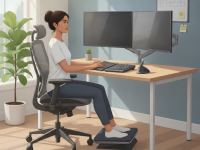
A good ergonomic chair with adequate lumbar support helps maintain the natural curve of the lower spine. When seated, aim for a hip angle of about 90 to 110 degrees, with your back fully supported. The seat depth should allow you to sit with your back against the chair while leaving a two- to three-finger gap between the edge of the seat and the back of your knees. Keep your feet flat on the floor or on a footrest to avoid compromising knee and hip alignment.
Desk height and surface
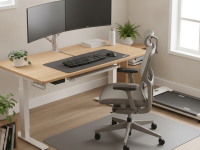
The desk height should let your forearms rest parallel to the floor when typing, with elbows close to your body and at about 90 degrees. A desk that’s too high or too low can tilt the shoulders forward or create torque in the spine. If possible, use an adjustable desk that enables smooth transitions between sitting and standing, and ensure there is enough leg clearance under the desk for comfortable movement.
Monitor and keyboard placement
Position the monitor so the top third of the screen is at or just below eye level, about 20 to 30 inches away from your face. The monitor should be directly in front of you to avoid twisting your torso. The keyboard and mouse should be on the same surface, close enough to keep wrists straight and shoulders relaxed. A slight wrist posture with a neutral hand position reduces strain on the forearms and neck.
Foot support and leg room
Ensure both feet have flat contact with the floor or a stable footrest. Elevating the feet slightly or crossing legs reduces circulation and can increase muscle tension; a flat, supported base is preferable. Adequate leg room under the desk prevents hip impingement and encourages a more open hip angle, supporting better low back posture.
Flexibility and sit-stand considerations
Balance is key. If you use a sit-stand setup, gradually transition to standing to avoid fatigue and provide time for your muscles to adapt. Alternate positions every 30 to 60 minutes, and incorporate micro-mercises, gentle stretches, or short walks to reduce stiffness and improve circulation. Standing desks are most effective when combined with supportive footwear and a comfortable anti-fatigue mat.
Practical steps to implement immediately
- Assess your current setup: check chair height, desk height, monitor position, and the distance between your eyes and the screen. Make small, incremental adjustments rather than a single large change.
- Set your chair to maintain a neutral spine with lumbar support; use a cushion or lumbar roll if needed.
- Adjust desk height so your forearms are parallel to the floor and elbows are at about 90 degrees. Align keyboard and mouse to minimize wrist deviation.
- Place the monitor at eye level and directly in front of you to avoid neck twisting. Keep the screen distance at about 20–30 inches (roughly an arm’s length).
- Use a footrest or ensure feet are flat on the floor. Avoid crossing legs for extended periods.
- Incorporate movement: stand or walk for 2–5 minutes every 30–60 minutes, and perform gentle stretches during breaks.
- Invest in a sit-stand desk or a height-adjustable desk converter if possible, and practice safe transitions between positions.
- Keep frequently used items within easy reach to prevent twisting or leaning sideways to reach for objects.
Stretching and strengthening to complement the setup
Alongside an ergonomic desk, targeted stretches and strengthening can support sciatic nerve health. Include gentle movements that improve hip mobility, hamstring flexibility, and core stability. Always move within a comfortable range and discontinue any exercise that increases pain.
- Knee-to-chest stretch: Lie on your back, pull one knee toward your chest, hold 20–30 seconds, switch sides. This helps reduce lower back tension that can contribute to sciatic symptoms.
- Piriformis stretch: Cross one leg over the other and gently press the elevated knee away from the body to release tightness in the buttock area, holding for 20–30 seconds each side.
- Hamstring stretch: Sit or stand and gently reach toward your toes or use a strap to lengthen the hamstrings without forcing the stretch beyond a comfortable range.
- Hip flexor stretch: Step into a lunge position and tilt the pelvis forward to release tightness in the front of the hip. Hold 20–30 seconds per side.
- Core stability: Engage the core with pelvic tilts and abdominal bracing exercises to support the spine and reduce low back strain during desk tasks.
Safety, myths, and when to seek care
Common myths emphasize either total rest or immediate aggressive therapy for sciatic pain. In reality, evidence supports a balanced approach: gradual activity, ergonomic adjustments, targeted exercises, and professional guidance when needed. If you experience sudden onset of severe leg weakness, numbness in the groin or bowel/bladder changes, or if pain worsens despite improvements in your setup after several weeks, seek medical evaluation promptly. Persistent or recurrent symptoms deserve professional assessment to rule out disc herniation or other conditions requiring targeted treatment.
Maintaining long-term E-E-A-T and trust
This article reflects established ergonomic best practices that health and occupational therapy professionals routinely recommend. It emphasizes experience-based strategies—such as chair selection, desk height, monitor alignment, and movement programs—that reduce sciatic nerve irritation during work. For readers with chronic or severe symptoms, a personalized assessment by a licensed clinician (such as an occupational therapist or physical therapist) can tailor recommendations to your body, job tasks, and space. Always consider professional advice for ongoing pain management and functional goals.
Conclusion: Your proactive roadmap to pain-preventive work
Implementing an ergonomic desk setup for sciatica prevention is a practical, gradual process. Start with the fundamentals—chair support, desk height, monitor and keyboard alignment—and build a routine of microbreaks and targeted stretches. By combining evidence-based adjustments with consistent movement, you can reduce sciatic irritation, improve comfort, and sustain productivity. Your workspace should support your health today and in the years ahead.